A first-of-its-kind solution in the academic market: students analyze their own behavior
OperantLab
Behavior Analysis in the digital age

A groundbreaking platform for teaching Experimental Behavior Analysis.

An exclusive technological solution for higher education institutions, developed to digitize the conditioning laboratory experience with scientific rigor. Computer program with Registration Certificate issued by INPI — BR512026003062-5.

Historical context

Ethics, Laws and Costs in Teaching Experimental Behavior Analysis

For decades, the study of operant conditioning relied on animals in the laboratory. Over time, laws such as the Health Research Extension Act (USA, 1985) and Brazil's Lei Arouca (Law No. 11,794/2008) established mandatory ethics committees — IACUC and CEUA — for any research involving animals. Approvals began taking months, operational costs rose, and access to animal behavior laboratories moved out of reach for most institutions.

In 1994, Sniffy the Virtual Rat emerged as an alternative: no animals, no bureaucracy. Sniffy evolved through its most recent version in 2011, offering 47 practical exercises. But the limitation remains — behavior is generated by algorithm, not by a living organism. The data are not real.

OperantLab™ solves this. Developed by an instructor with 20 years of teaching with real rats and 4 years with the virtual rat, the software is born from the hands-on experience of someone who knows both realities. Using figures as visual stimuli, it collects responses from real human participants — no CEUA or IACUC required, no vivarium costs, with genuine operant behavior data. In a computer lab or online research setting, real results with full legal compliance.

What is OperantLab™

Not a simulator. An experimental chamber.

A simulator mimics a real system. OperantLab™ does not mimic anything — it is the experimental environment, generating valid data for Behavior Analysis research.

01

Skinner Box for humans

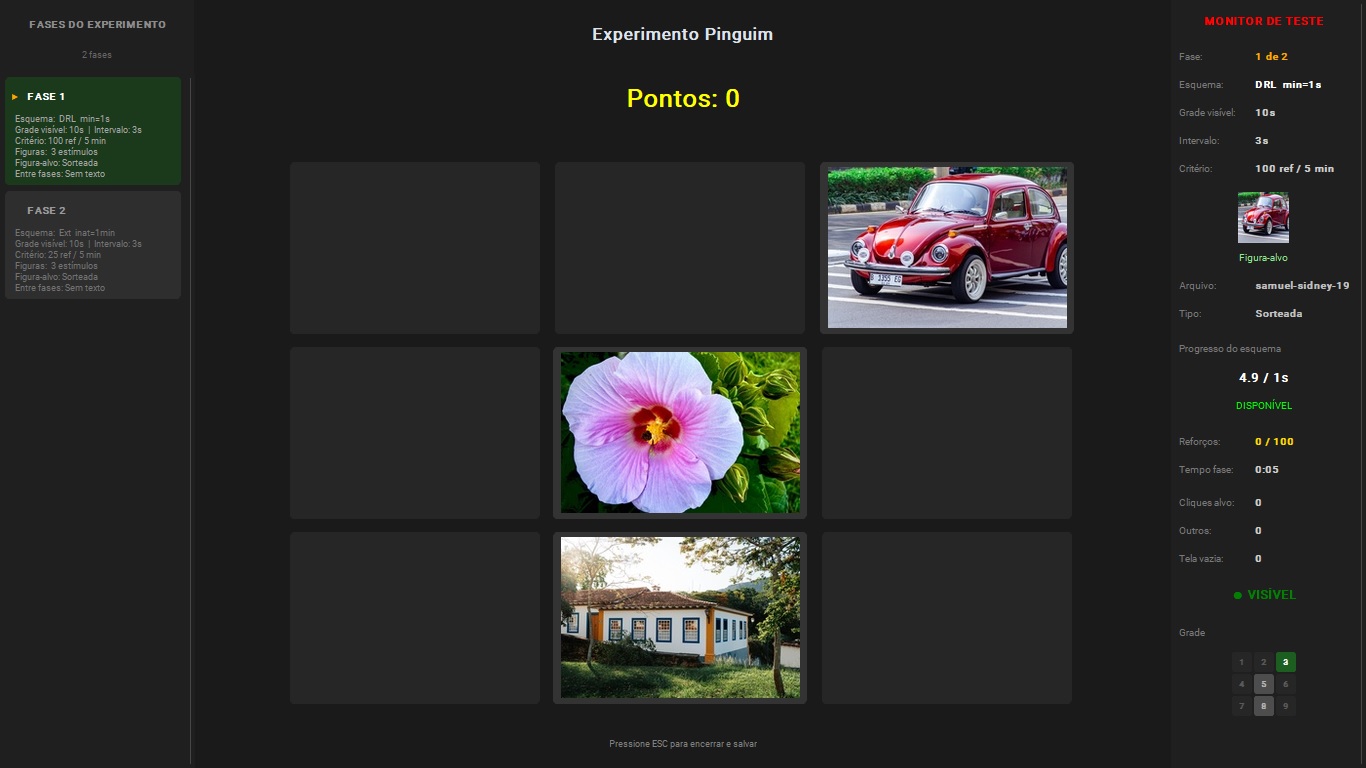
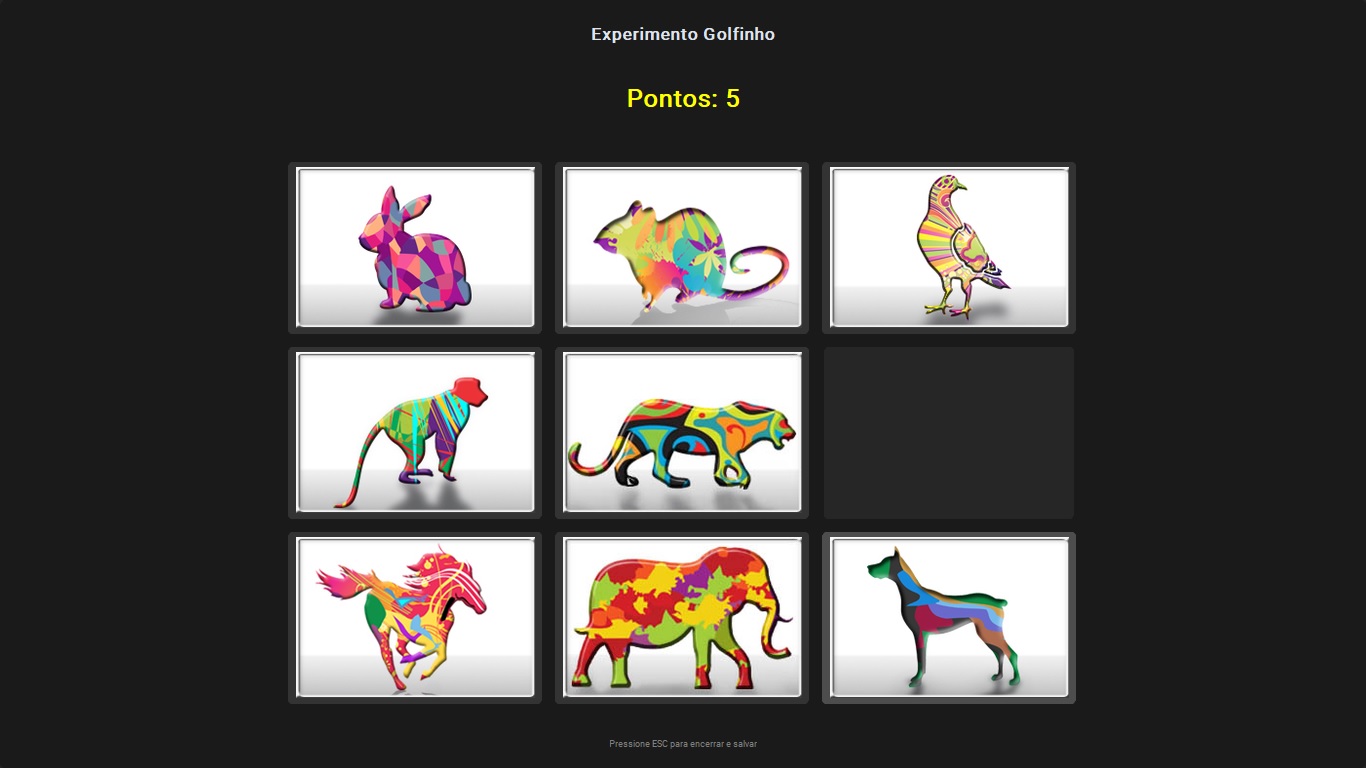
Participants interact with a 3×3 grid of figures. Each click is an operant response — and the software delivers or withholds reinforcement according to the schedule configured by the instructor.

02

Real data collection

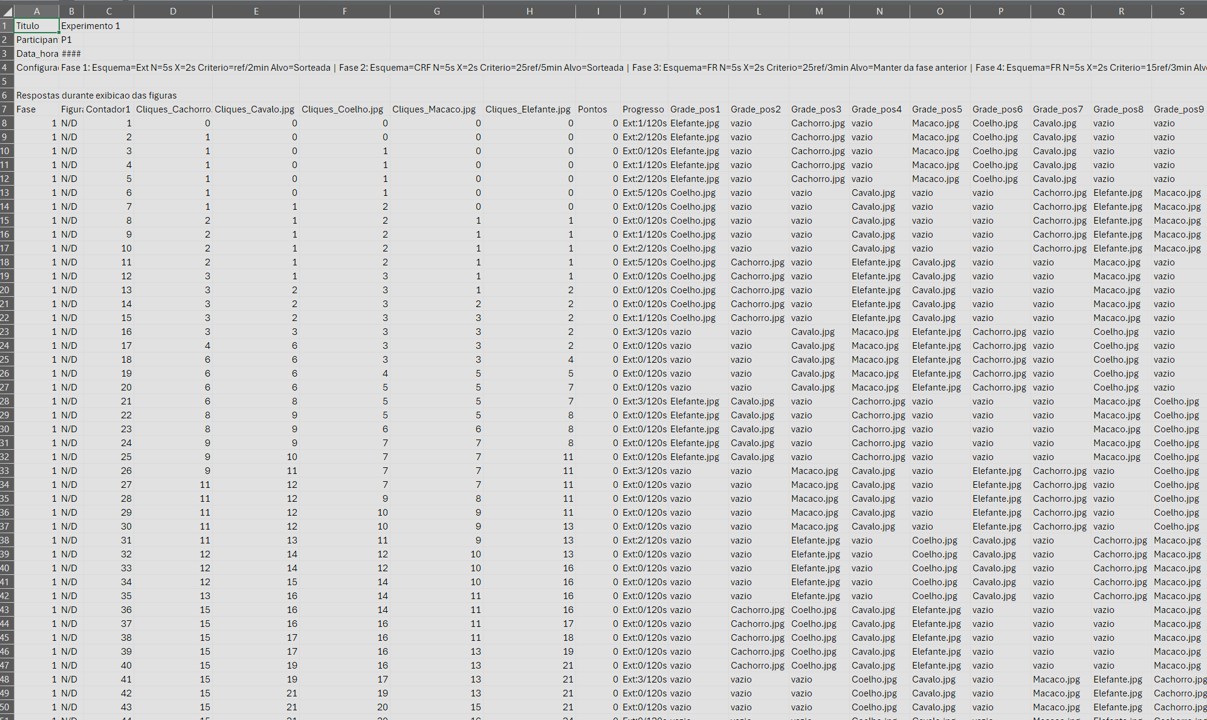
Each session generates a CSV file with experiment configuration, responses per second, clicks per figure, latencies, reinforcements and text responses between phases. Ready for Excel or statistical analysis.

03

From theory to demonstration

Acquisition, extinction, stimulus control, self-control, high rate in FR and low rate in DRL: classic Behavior Analysis concepts become visible to students in a 15-minute session.

Download OperantLab™
Who it is for

Built for Psychology programs and research laboratories.

01

Behavior Analysis Courses

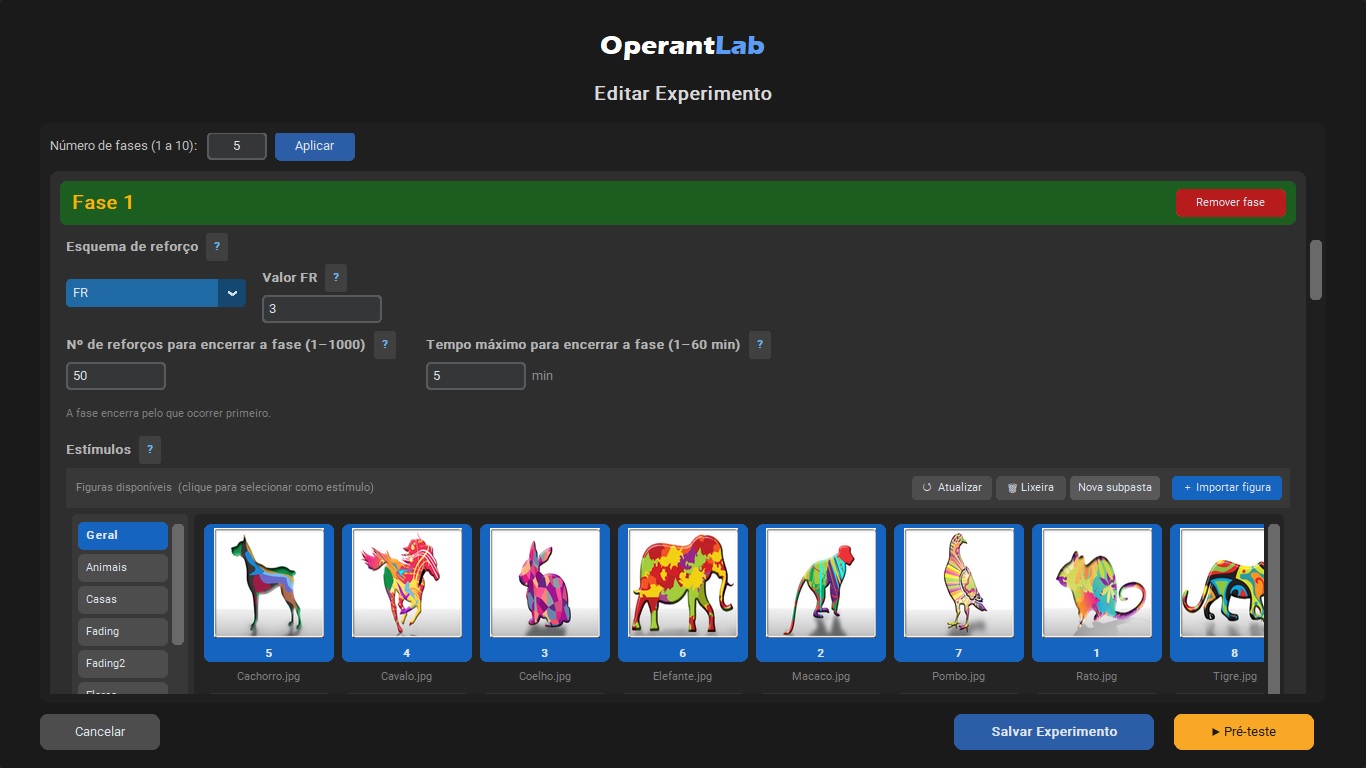
Instructors configure didactic experiments — FR, DRL, extinction, fading — and students run them in class, with real data collection for discussion.

02

Experimental Research Laboratories

Researchers publish protocols for their participants and synchronize data across lab machines. Files are protected on the server with AES-256-GCM encryption.

03

Psychology and Behavioral Sciences Programs

Compatible with institutional computer labs — Windows 10/11 and Linux, no permanent internet connection required during sessions.

Features

Everything a Behavior Analysis course needs.

11 reinforcement schedules

CRF, FR, VR, FI, VI, FT, VT, DRL, DRH, Extinction and LAG — all with configurable parameters.

Real-time monitor

Pre-test panel shows clicks, reinforcements, progress, target figure thumbnail and grid state — all in real time.

CSV Data Export

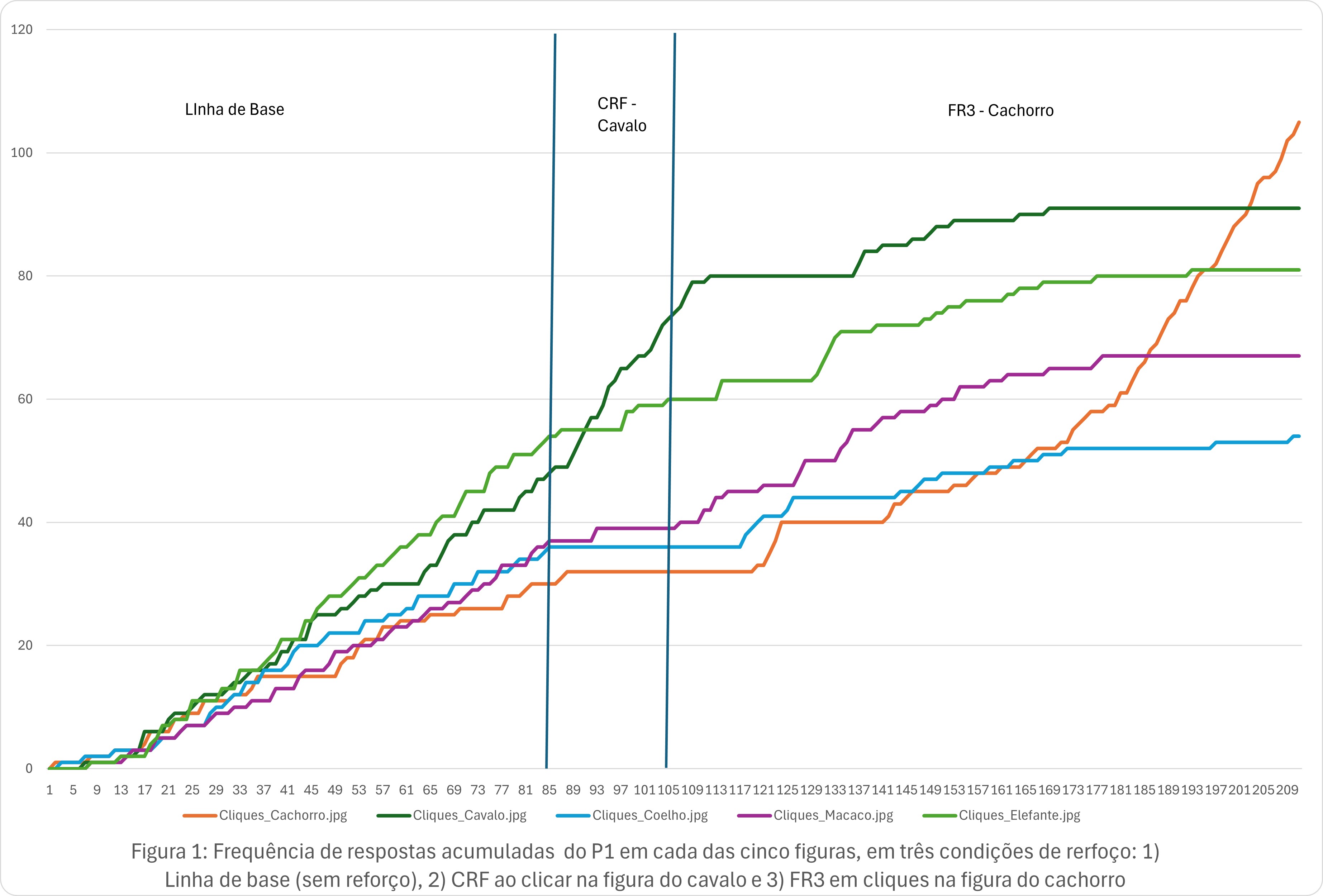
Cumulative Response Frequency record. Each session generates a CSV file with headers, configuration and three data sections — ready for Excel, R or SPSS.

Export / Import

Share complete experiments between machines with .oplab files — configuration and figures embedded.

Trilingual

Interface in Portuguese, English and Spanish — no barrier for international students or collaborations.

Four user roles

Teaching environment (Instructor + Student) and Research environment (Researcher + Participant) — independent, with no mutual interference.

Discrimination Training

Configure multiple stimulus figures with selective reinforcement to demonstrate discriminative learning and stimulus control development.

Generalization

Present stimulus variations after discrimination training to observe and quantify response generalization across similar stimuli.

Fading

Implement gradual fading procedures of prompts and auxiliary stimuli to transfer stimulus control in a programmed and systematic way.

Functional Stimulus Class

OperantLab™ cannot form a functional stimulus class, but it can be used to test whether a functional stimulus class has been established.

Rule Control

Implement instructions and rules as verbal discriminative stimuli to study how verbal behavior controls operant responses in varied contexts.

Self-Rule

Students and participants can write about their own rules during the session and/or feelings between phases.

Who it is for

Psychology programs that train behavior analysts.

Course Coordinators

Academic differentiation

Offer your students a laboratory experience other programs don't have. Experimental Behavior Analysis, Learning and Radical Behaviorism courses gain a real hands-on component, not merely a demonstration.

Instructors

Classes with real data

Configure an experiment in minutes. Run it with the entire class in the computer lab. Use the generated CSVs to discuss, in class, the acquisition curve, high rate in FR and low rate in DRL, or resistance to extinction — with your students' own data.

Researchers

Data collection at scale

Environment independent from Teaching. Allows the researcher (or graduate student) to build their own protocols and run data collection with participants without interfering with didactic material. Supports multiple phases, precise time control and automatic data export.

Schedule a demo on WhatsApp Download OperantLab™
The schedules

Eleven reinforcement schedules, all the classics.

Each phase of the experiment accepts one of the schedules below, with independent parameters and configurable completion criteria.

Code Name Description
CRF Continuous Reinforcement Each click on the target figure earns points.
FR Fixed Ratio Points after exactly N clicks on the target figure.
VR Variable Ratio Points after a variable number of clicks (mean N).
FI Fixed Interval Points on the first click after a fixed interval of N seconds.
VI Variable Interval Points on the first click after a variable interval (mean N s).
FT Fixed Time Automatic points every N seconds (no click required).
VT Variable Time Automatic points at variable intervals (mean N s).
DRL Differential Reinforcement of Low Rates Points if the inter-click interval exceeds N seconds.
DRH Differential Reinforcement of High Rates Points if N clicks occur within a time window.
Ext Extinction No click produces points; criterion: time or inactivity.
LAG Variability Reinforcement Points only when the click sequence differs from the N previous responses (LAG N). Reinforces behavioral variability as an operant dimension.
NEW — v1.4

Variability Reinforcement (LAG Schedule)

OperantLab now supports LAG reinforcement schedules, allowing students to observe and analyze the emission of novel responses. Configure differentiation criteria and see in practice how variability can be an operant dimension controlled by consequences.

Didactic examples

Fifteen ready-made experiments for your next class.

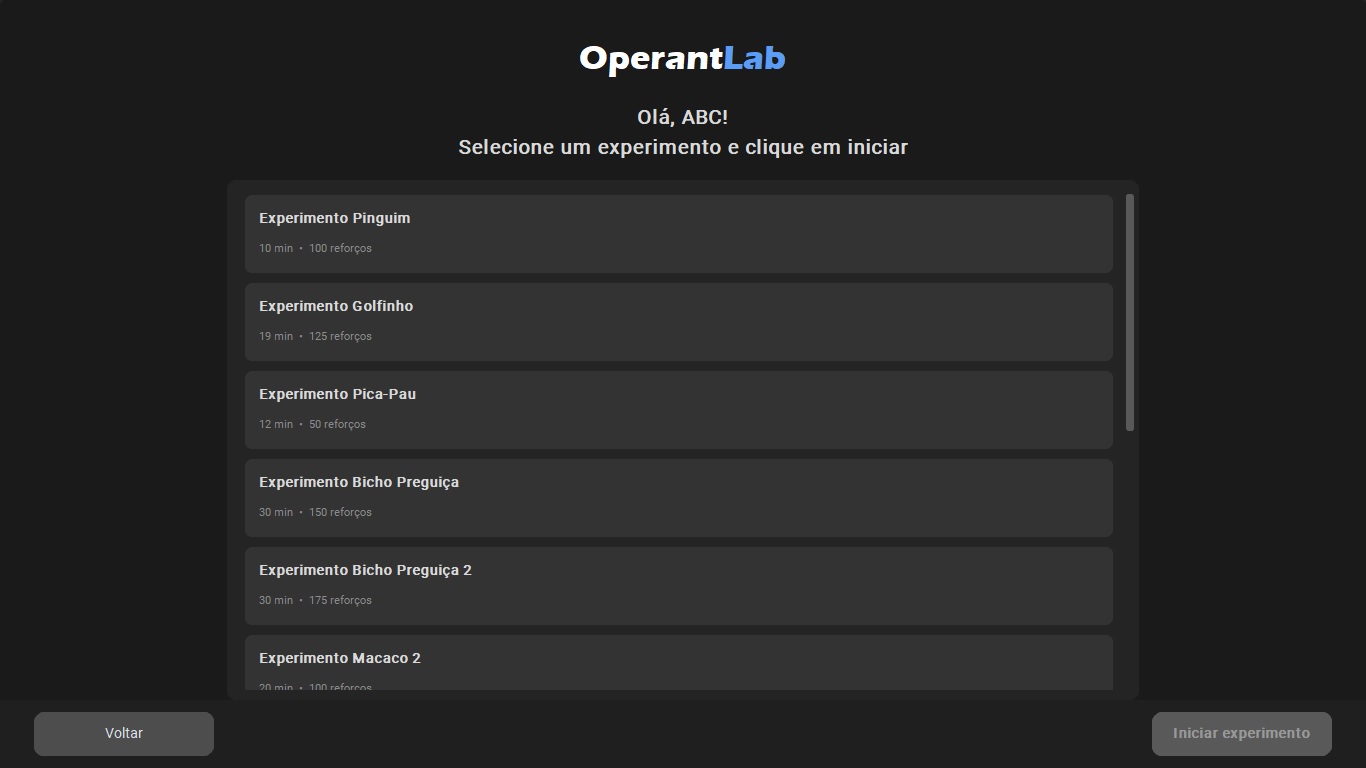
OperantLab™ comes with pre-configured experiments — just open, run and discuss the data with your class.

Experiment 01

Acquisition and Extinction

Demonstrates how a behavior is established by CRF and then extinguishes without reinforcement. Concepts: acquisition, extinction, resistance to extinction.

CRFEXTINCTION2 PHASES
Experiment 02

Fixed Ratio vs. Variable Ratio

Compares the post-reinforcement pause of FR with the constant rate of VR. Classic analogy: piece-rate pay vs. slot machine.

FRVR2 PHASES
Experiment 03

Fixed Interval vs. Variable Interval

Shows the scallop pattern of FI and the constant rate of VI. Analogy: waiting for a bus on a fixed schedule vs. an unpredictable bus.

FIVI2 PHASES
Experiment 04

Complete didactic sequence

A tour through the main schedules in a single session. Ideal for an introductory class — estimated duration: 15 to 25 minutes.

CRFFRVREXT4 PHASES
Experiment 05

Stimulus Control

The target figure changes with each phase; the participant must discover which one it is. Demonstrates discrimination and stimulus control.

CRFDISCRIMINATION3 PHASES
Experiment 06

DRL: Self-Control and Impulsivity

In DRL, responding too fast delays reinforcement. The participant learns to inhibit responses. Opens discussion about impulsivity.

CRFDRL2 PHASES
Download and use these experiments WhatsApp
Screenshots

Screenshots

Click to enlarge.

Licensing

Packages by laboratory

Each license covers one machine. Choose the package that matches your laboratory size. Prices in Brazilian Reais (BRL). Contact us for international pricing in USD.

Essential
8
licenses included
Monthly
R$ 249
/mo · 6-month minimum
R$ 31.13 per license/mo
Annual · save 16%
R$ 2.499
/year
R$ 26.03 per license/mo
  • Instructor support
  • Reference materials
  • Assisted implementation
Request a quote
Basic
15
licenses included
Monthly
R$ 349
/mo · 6-month minimum
R$ 23.27 per license/mo
Annual · save 19%
R$ 3.399
/year
R$ 18.88 per license/mo
  • Instructor support
  • Reference materials
  • Assisted implementation
Request a quote
Standard
30
licenses included
Monthly
R$ 569
/mo · 6-month minimum
R$ 18.97 per license/mo
Annual · save 21%
R$ 5.399
/year
R$ 15.00 per license/mo
  • Instructor support
  • Reference materials
  • Assisted implementation
Request a quote
Extended
50
licenses included
Monthly
R$ 849
/mo · 6-month minimum
R$ 16.98 per license/mo
Annual · save 24%
R$ 7.699
/year
R$ 12.83 per license/mo
  • Instructor support
  • Reference materials
  • Assisted implementation
Request a quote
Institutional
75
licenses included
Monthly
R$ 999
/mo · 6-month minimum
R$ 13.32 per license/mo
Annual · save 27%
R$ 8.699
/year
R$ 9.67 per license/mo
  • Instructor support
  • Reference materials
  • Assisted implementation
Request a quote

Need a different number of machines? Contact us for a custom quote.

Version history

Actively evolving software.

v1.3.1 — May 2026

  • Trial: works as an 8-machine package — set your institution name and all machines sync experiments between them
  • Trial: machine tracking per institution identical to licensed users (machine number, limit of 8)
  • Smooth upgrade path: when purchasing a license with the same institution name, already-published experiments remain accessible
  • Vendor panel: packages updated to 8, 15, 30, 50 and 75 licenses; individual license locked to 1 machine

v1.3.0 — May 2026

  • Redesigned splash screen: independent window, always visible even in fullscreen, registered brand image
  • Security: SSL verification enabled for all network connections
  • Trial: anonymous server-side registration for greater evaluation period integrity

v1.2.3 — May 2026

  • Brand identity: ™ symbol across all touchpoints
  • Splash screen displays INPI software registration and trademark numbers
  • Vendor panel: masked email in password reset code dialog

v1.2.2 — May 2026

  • Warning when accessing the system with the default password
  • Enhanced license security: machine limit enforced across all plans
  • CSV with Figure_Count column in both data blocks

v1.2.1 — April 2026

  • Critical fix: error when saving CSV to folder without write permission (WinError 5)
  • Default data folder now created automatically in Documents
  • New brand icon across all system windows

v1.2.0 — April 2026

  • Automatic experiment synchronization across lab machines
  • AES-256-GCM encryption for files sent to the server
  • Informational banner when receiving experiments from another machine
  • Inter and Source Serif 4 fonts embedded

v1.1.9 — April 2026

  • Anonymous session analytics with opt-out
  • 1-click experiment publishing to the lab
  • Trash with restore and sync

v1.0.0 — April 2026

  • 11 reinforcement schedules implemented and tested (including LAG)
  • Two independent environments: Teaching and Research
  • Institution-based licensing system via Supabase
  • Windows and Linux support
Download

7-day free trial. All features included.

Install, configure your experiments, run them with your class. No credit card, no remote installation — the software runs entirely on the lab machine.

1

Download the trial

Choose the version for your system (Windows or Linux) and download directly. Immediate access to all 11 schedules, no time limit or feature restrictions.

2

Use it for 7 days

Full access to all 11 schedules, all roles, data export, didactic examples. No limitations. No credit card required.

3

Acquire a license

At the end of the trial, the software will guide you through activation. The license is bound to the machine's hardware. Request as many licenses as your institution needs.

Available downloads

🪟 Windows v1.4.2 (Installer) 🐧 Linux v1.4.1 (AppImage)

Linux alternative: OperantLab_linux_v1.4.1.tar.gz

All versions: github.com/operantlabsoftware/operantlab-releases

WhatsApp support Institutional licenses
Contact

Let's talk about your program.

Coordinators and instructors: we respond within two business days with installer and guidance.

We are available to present the system in faculty meetings, give a live demonstration for your class, or answer technical questions about integration with your institution's computer lab.
Instagram
Start a conversation on WhatsApp
Business hours
Monday–Friday · 9 AM to 6 PM (Brasília, BRT / UTC-3)